# Edit HTML/CSS templates in the dashboard
October 15, 2026
You can now **create and edit HTML/CSS templates directly in the dashboard**. Previously, these templates could only be created and updated through the API. The new code editor puts your HTML and CSS beside a live preview, so you can see changes as you work.
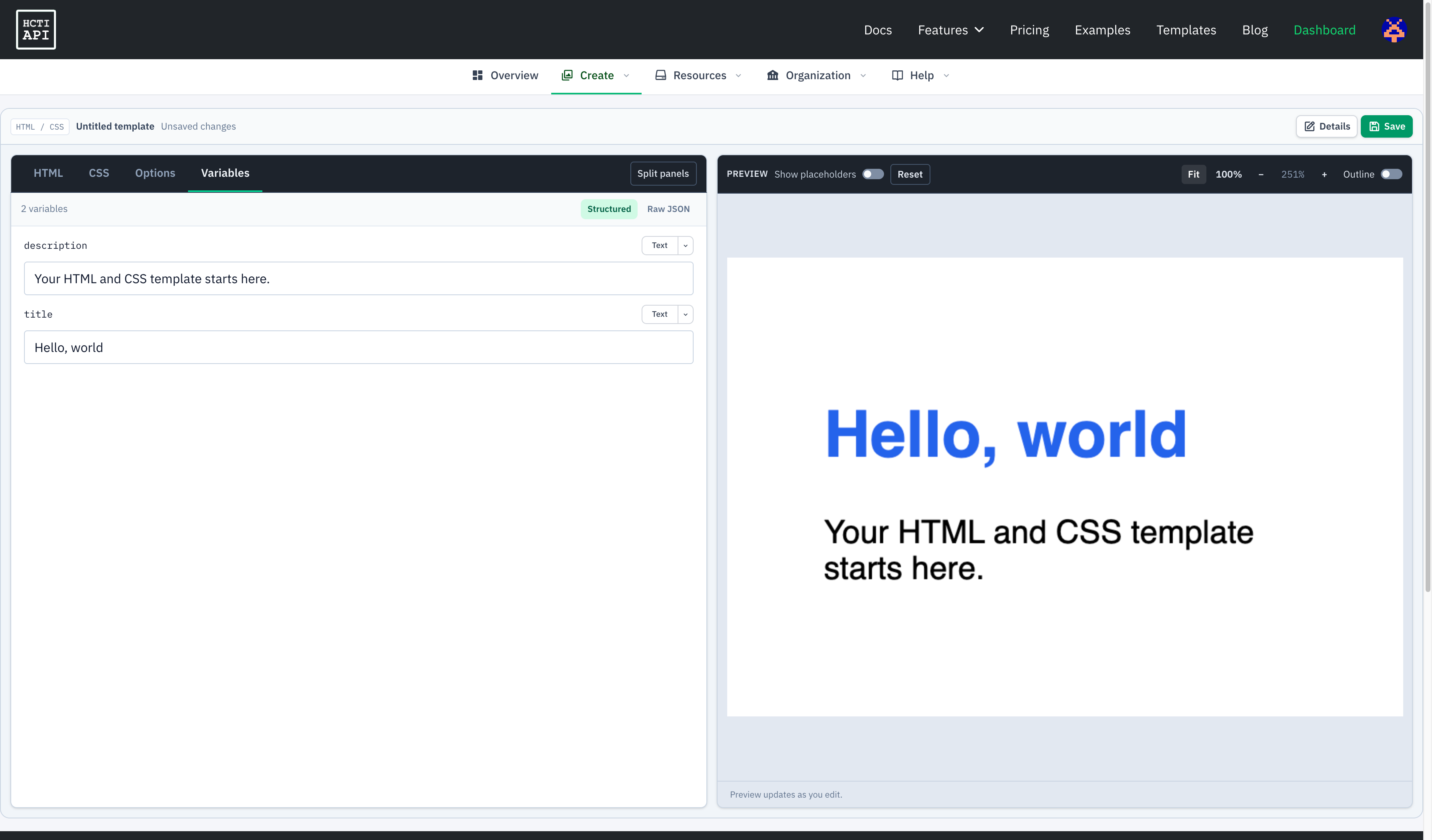
Open [Templates in the dashboard](https://htmlcsstoimage.com/dashboard/templates), click **Create New Template**, and choose **Code editor**. Existing HTML/CSS templates created through the API open in the same editor.
* Edit markup and styles in separate **HTML** and **CSS** tabs.
* Test Handlebars variables with structured fields or raw JSON, and toggle **Show placeholders** to inspect your layout.
* Configure fonts, viewport dimensions, capture settings, and other rendering options in **Options**.
* Click **Save** to save your template, then generate images through the API using its template ID and `template_values`.
The **Block editor** remains available for building templates visually with text, images, and layouts.
See [Editing HTML/CSS templates](/template-editor/html-css/) for a walkthrough, or the [Template Editor overview](/template-editor/) for both dashboard editors.
[All updates](/changelog/)
Previous: [HTML/CSS to Image is now in the Pulumi Registry](/changelog/2026-10-14-pulumi-registry/) — Oct 14, 2026